
Learning how to check Screen Time on your iPhone takes less than a minute—but understanding what those numbers mean and how to use them effectively is what actually matters. This guide walks you through both.
If you’ve ever felt uneasy about how much time you spend on your phone, you’re not alone. Apple introduced Screen Time for a reason: most of us have no idea how many hours we’re actually losing to our devices.
But here’s what I’ve learned after years of checking those numbers, feeling guilty about them, and eventually figuring out what to do instead: Screen Time is a tool, not a solution. It shows you the surface. What you do next is what determines everything.
In this guide, you’ll learn exactly how to check Screen Time on your iPhone, what the numbers actually represent, and—most importantly—what to do with that information once you have it.
How to Check Screen Time on iPhone: Step-by-Step
Checking your Screen Time on iPhone is straightforward. Here’s how to do it:
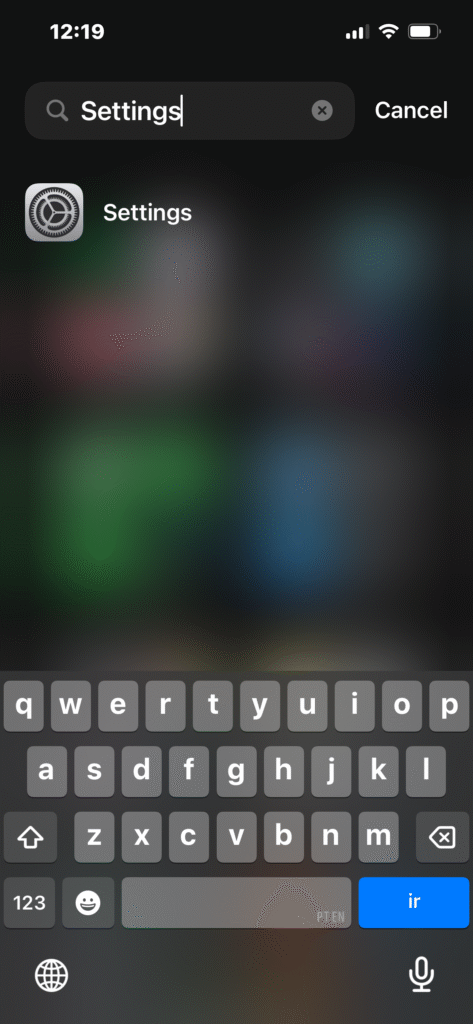
Step 1: Open Settings
Tap the Settings app on your iPhone (the gray icon with gears).
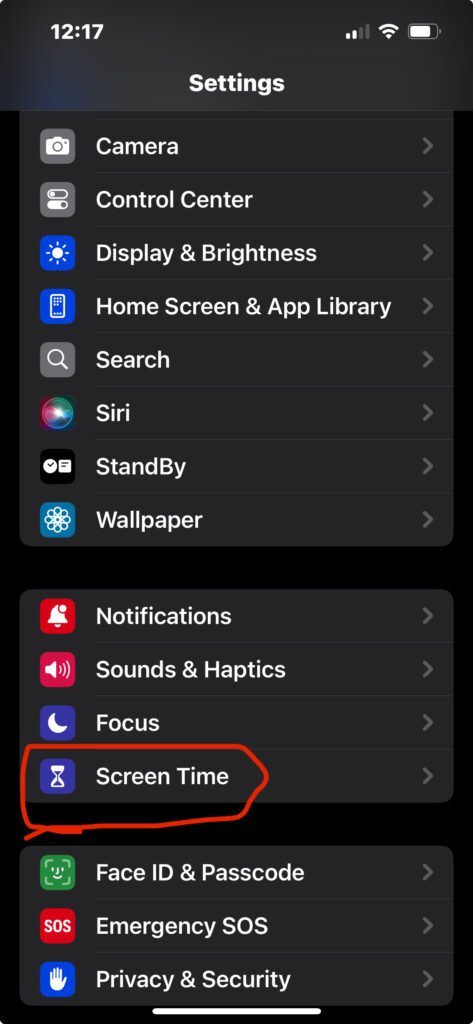
Step 2: Scroll Down and Tap “Screen Time”
You’ll find it in the main settings menu, usually below “Do Not Disturb” or “Focus.”
Step 3: Turn On Screen Time (If It’s Your First Time)
If you haven’t used Screen Time before, you’ll see an option to Turn On Screen Time. Tap it, and follow the brief setup prompts.
If Screen Time is already enabled, you’ll immediately see your stats.
Step 4: View Your Daily Average
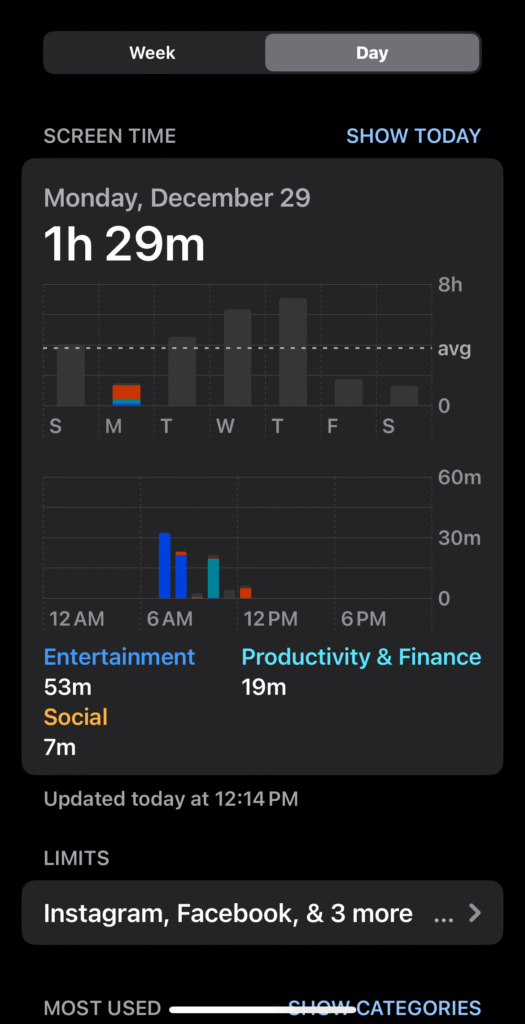
The first screen shows your Daily Average—the average amount of time you’ve spent on your phone per day over the past week.
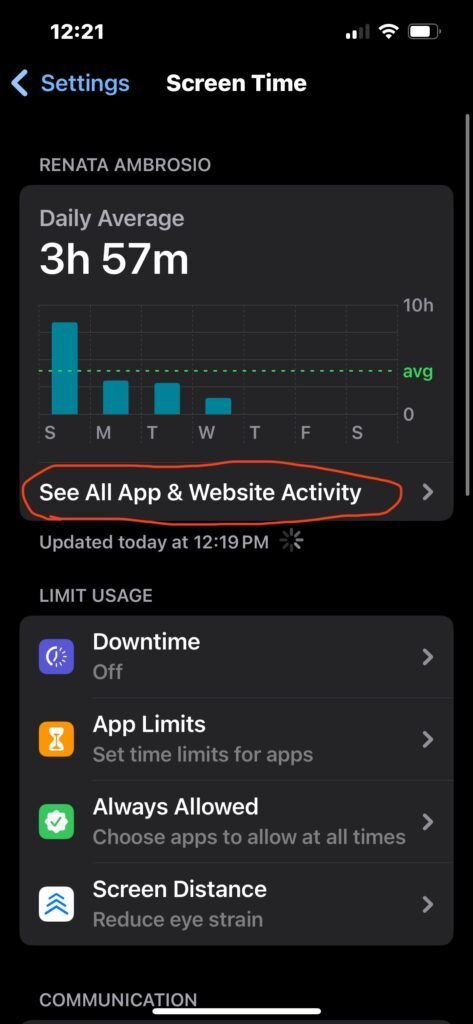
Step 5: Tap “See All App & Website Activity” for Details
This is where the real information lives. Tap this option to see:
- Total daily and weekly screen time
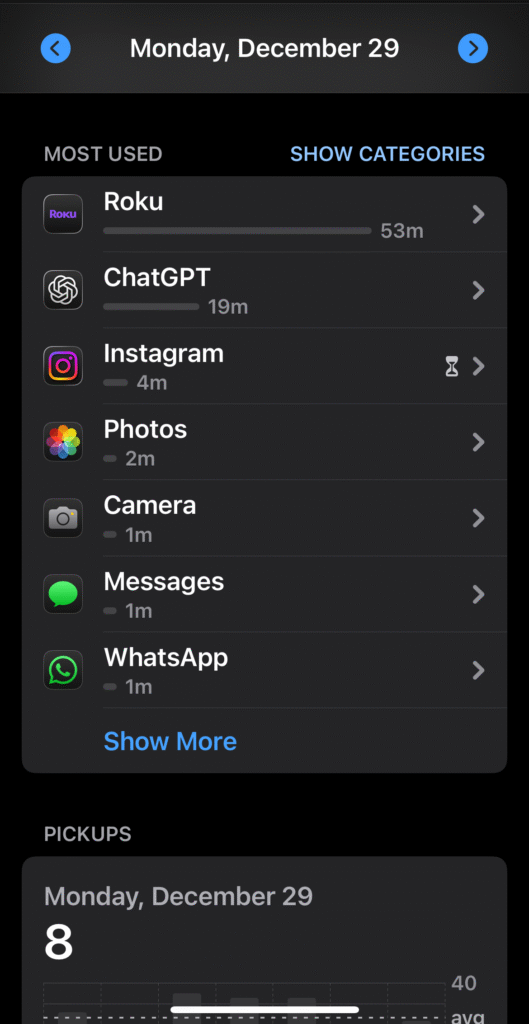
- Most-used apps (ranked by time spent)
- Time spent by category (Social Networking, Productivity, Entertainment, etc.)
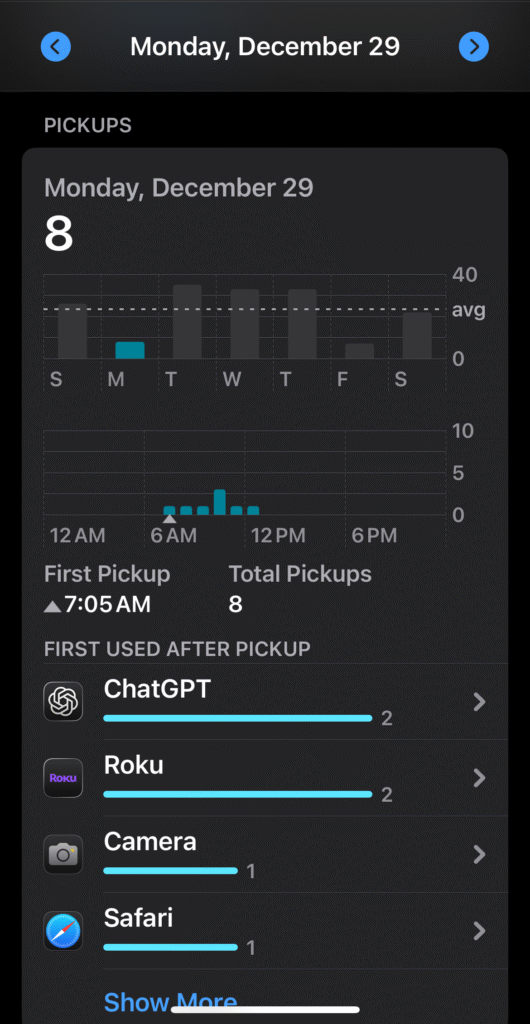
- Pickups (how many times you unlocked your phone)
- Notifications (how many you received)
The data updates automatically throughout the day and resets at midnight.
What Screen Time Numbers Actually Mean
At first glance, Screen Time looks straightforward. You open it, see a number, and either feel okay about it or terrible. But the numbers often cause unnecessary guilt because they lack important context.
Here’s what to understand:
Daily Average Is Just a Rolling Calculation
One bad day can skew your weekly average significantly. If you spent six hours on your phone yesterday because you were traveling or sick, your “daily average” will look high even if the rest of your week was fine.
Background Usage Can Inflate Numbers
Apps running in the background—music, podcasts, navigation—count toward Screen Time even when you’re not actively looking at your phone. This means your total might be higher than the time you actually spent scrolling. My daily average for example is usually inflated by Roku, which is the app that I use as my remote control for the tv (I actually lost the actual remote lol).
Productive Use and Mindless Use Look Identical
Screen Time doesn’t distinguish between reading an article, researching something meaningful, and mindlessly scrolling TikTok for an hour. Two hours on your phone could be two very different experiences, but the data treats them the same.
Screen Time Doesn’t Measure Intention
The most important thing Screen Time can’t tell you is why you picked up your phone. Was it intentional? Was it compulsive? Did you get what you needed and put it down, or did you lose 30 minutes without realizing it?
In other words: high numbers don’t automatically mean a problem. And low numbers don’t automatically mean you’re fine.
Why Screen Time Alone Doesn’t Fix Phone Addiction
This is where most people get stuck. They check Screen Time and feel bad. They set app limits and then promise themselves they’ll “use their phone less.” And nothing changes.
Why? Because Screen Time measures quantity, not quality.
It doesn’t tell you:
- Why you picked up your phone in the first place
- What emotion triggered it (boredom, anxiety, avoidance, loneliness)
- Whether the use was intentional or reactive
- What you might have done instead if your phone wasn’t so accessible
Without that context, Screen Time becomes a source of shame—not clarity.
You see a high number. You feel guilty. You try to “do better.” But you haven’t addressed the underlying behavior, so the cycle continues.
Real change doesn’t come from tighter controls. It comes from understanding why the habit exists in the first place.
What to Actually Do After You Check Screen Time
Instead of asking “How many hours was I on my phone?”, better questions are:
1. What apps are draining my attention the most?
Look at your Most Used Apps list. Are these apps adding value to your life? Or are they just the easiest thing to reach for when you’re bored, anxious, or avoiding something?
If social media apps dominate your list, that’s a sign that passive consumption has replaced intentional activity.
2. When do I reach for my phone automatically?
Notice the patterns. Do you pick up your phone first thing in the morning? During meals? While waiting in line? Before bed? These moments reveal your triggers.
3. What moments of the day feel most fragmented?
If your Pickups number is high (30, 40, 50+ times a day), your attention is being constantly interrupted. Even if your total screen time isn’t extreme, frequent pickups fragment focus and prevent deep work or rest.
4. What am I avoiding when I start scrolling?
This is the hardest question—and the most important one. Often, phone use isn’t about the phone. It’s about what you’re not doing. Sitting with discomfort. Processing emotions. Starting a hard task. Facing something you’d rather not think about.
Awareness beats restriction. Once you understand why you’re using your phone the way you are, you can start designing better systems.
A Smarter Way to Use Screen Time
Screen Time works best as:
- A diagnostic tool, not a rule enforcer
- A mirror, not a judge
- A starting point, not a solution
Use it to notice patterns. Then redesign your environment to support the life you actually want:
Fewer triggers: Remove apps from your home screen. Turn off non-essential notifications. Put your phone in a drawer or another room when you’re working or spending time with people.
Clearer boundaries: Decide when phone use makes sense (responding to messages, navigating, checking calendar) and when it doesn’t (first thing in the morning, during meals, an hour before bed).
More intentional offline anchors: Replace phone time with something that actually restores you. Reading. Walking. Cooking. Talking to someone face-to-face. Building something.
That’s where digital wellness actually begins.
If you’re ready to move beyond just checking Screen Time and want a complete system for reducing phone dependence, start here: How to Stop Scrolling (Complete Guide). It walks through the specific steps that worked for me after years of failed attempts.
And if you’re wondering why scrolling feels so impossible to stop in the first place, this post breaks down the mechanics: Why Social Media Scrolling Feels Addictive (And What to Do Instead).
Understanding the Bigger Picture: Digital Wellbeing
Checking Screen Time is useful. But it’s just one data point in a much larger question: How do I build a healthier relationship with technology?
For me, the answer wasn’t about using my phone less. It was about using it differently. With intention. With clear rules. And with an understanding of what I was actually trying to protect.
That shift—from restriction to redesign—is what digital wellbeing is actually about. Not fear. Not rejection. Just clarity.
If this resonates, you might find value in this post: Digital Wellbeing Is Not About Less Tech—It’s About Better Rules. It’s the essay that outlines the After Scroll philosophy and why I built this site in the first place.
Final Thoughts on How to Check Screen Time on iPhone
Checking Screen Time on your iPhone is easy. The real challenge is knowing what to do with the information once you have it. Numbers don’t change behavior—decisions do.
Screen Time shows you the surface: hours, apps, pickups. But underneath that data is a question only you can answer:
Is this how I want to spend my attention? If the answer is no, you already know what to do next.
Explore More Digital Wellness Resources
If you’re ready to build a healthier relationship with your phone—without obsessing over numbers or relying on willpower alone—explore our full collection of Digital Wellness essays.
We cover everything from morning routines without screens to understanding why scrolling feels addictive to building systems that actually work long-term.