

Airtable vs ClickUp for bloggers. My Airtable system stalled my first blog. Here’s how ClickUp helped me publish 75 posts in 3 months.
Imagine opening your laptop, glancing at a simple board, and instantly seeing where every post is: ideas, drafts, editing, scheduled, published. No hunting through views, no wondering what broke in the background. You drag one card to “Writing,” open it, and start typing.
That’s how After Scroll runs today. But it’s not how my first blog worked at all.
When I launched my first site, I tried to build the entire content system inside Airtable. On paper, it looked brilliant: multiple tables, relational fields, color‑coded statuses, formulas, automations. It felt like the kind of tool “serious” creators used.
In reality, the system slowly became heavier than the work it was supposed to support. Every time I wanted to tweak something—a new field, a different view, a slightly better automation—it meant another round of maintenance. I spent more time fixing the system than writing for it.
That blog never really took off.
When I started After Scroll, I made a different choice. From day one, I built the entire editorial workflow inside ClickUp. One task per post. One clear pipeline. Fewer knobs to turn.
In the first three months of After Scroll, I published 75 posts.
This is the story of why my Airtable setup quietly collapsed, how a simple ClickUp pipeline changed everything, and how to decide which tool actually fits the way you want to run your blog.
When the System Becomes the Project
Airtable is a powerful tool. And that was part of the problem.
For my first blog, I built what felt like a “proper” content database:
- Separate tables for ideas, posts, keywords, and promotion
- Linked records so every idea pointed to a post, which pointed to a platform
- Formulas for publish dates, word counts, and content status
- Multiple views for “This Week,” “By Category,” “By Platform,” and more
It looked impressive. It also meant that:
- Adding a new post usually required touching several tables.
- Small tweaks could break a formula somewhere else.
- I spent far too long designing views I didn’t actually use.
Over time, something subtle happened: the Airtable base became the project.
I wasn’t asking, “What will I publish this week?” I was asking, “Which field should I add so this all feels more organized?”
The tool was more complex than the work it was supposed to support. And once your system demands more energy than your actual writing, it’s only a matter of time before you stop opening it.
Why Airtable Looked Perfect (and Why It Wasn’t)
I chose Airtable for all the reasons productivity people love it:
- It’s a database, not just a list.
- You can relate everything: posts to keywords, posts to platforms, posts to offers.
- You can build almost anything if you’re willing to tinker.
For a large team running multiple brands and campaigns, this makes sense. For one person running a blog, it can quietly become overkill.
Here’s what I didn’t fully appreciate at the time:
- Every field is a decision. Each new column isn’t just data—it’s another thing your brain has to honor, maintain, and update.
- Every view is a promise. When you create fifteen different views, you’re silently promising yourself you’ll use them. Most of us don’t.
- Every automation is a potential failure point. The more you automate, the more you have to monitor.
My Airtable base looked like a content command center. My actual publishing cadence told a different story.
The Hidden Cost of an Over‑Engineered Tool
The problem with an overly complex system isn’t just the time it takes to maintain. It’s the mental drag it creates.
Before I could write, I had to:
- Decide which view to work from
- Check that formulas weren’t broken
- Update fields so filters still made sense
By the time I reached the blank page, I’d already spent half my energy “managing” the work.
This mirrors what I later wrote about in Digital Wellbeing Isn’t About Less Tech—It’s About Better Rules: technology without boundaries quietly takes over the space it was supposed to support.
Airtable wasn’t the villain. My use of it was. I built a system for a team when I only needed a clear path for one very human brain.
What Changed When I Moved Everything Into ClickUp
When I started After Scroll, I gave myself a constraint: the system had to be simpler than the work.
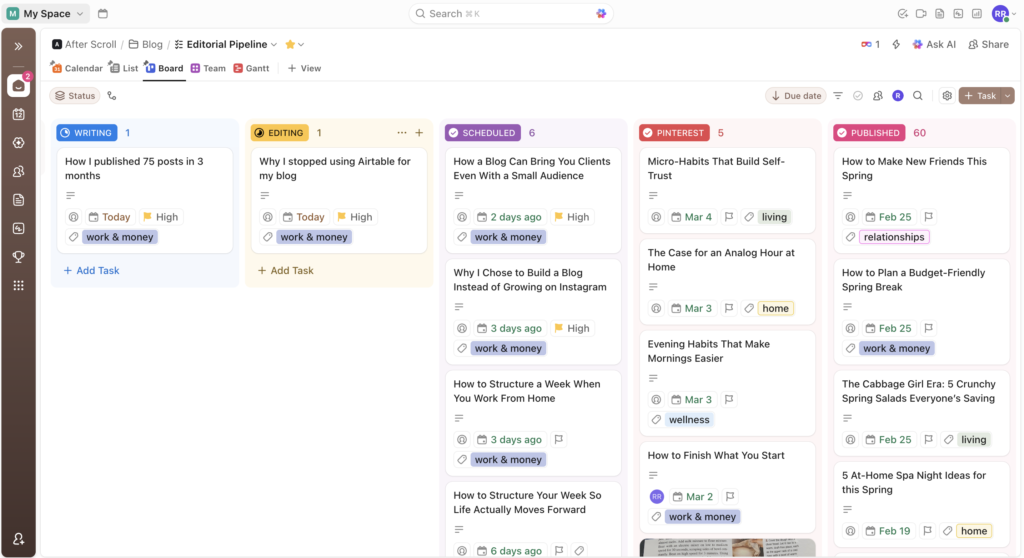
So instead of rebuilding another database, I opened ClickUp and created the editorial pipeline I actually needed:
- Idea – quick brain dumps and loose titles
- Backlog – ideas worth exploring soon
- Writing – what I’m actively drafting
- Editing – pieces that need a final pass
- Scheduled – posts with dates on the calendar
- Pinterest / Published / Optimize – everything after the article is live
One task per post. One place for the draft. One URL field for the final link.
There were no extra tables to update, no separate place for keywords, no elaborate views to maintain. The board itself told me what to do next.
Because the tool matched the work, I could finally focus on the part that mattered: publishing.
In three months, that simple pipeline supported 75 posts. Not because I suddenly became more disciplined, but because the system stopped getting in the way.
If you want to experiment with a similar setup, you can try building your own blog pipeline inside ClickUp using the same idea: one task per post, one clear path from idea to published.
Airtable vs ClickUp for Your Blog: The Real Question
This isn’t really a fight between two tools. It’s a question of what kind of work you’re doing and how much system your brain can realistically maintain.
Here’s how I think about it now:
When Airtable Might Make Sense
Airtable can be a great fit if you:
- Run multiple brands or sites with shared assets
- Need relational data (for example, mapping hundreds of posts to dozens of categories, campaigns, or products)
- Work with a larger team that needs powerful filtering, reporting, and integrations
In that world, the extra structure can earn its keep.
When ClickUp Shines for a Blog
ClickUp feels better aligned when you:
- Want a visible pipeline more than a database
- Need one home where tasks, drafts, checklists, and due dates live together
- Care more about consistent publishing than clever architecture
- Prefer to see your week and your blog tasks in the same place
In How a Blog Can Bring You Clients Even With a Small Audience, I talk about your site as a quiet client engine: a small library of thoughtful posts that keep working while you live your life. ClickUp supports that library by keeping the process of getting posts out of your head and onto the internet extremely clear.
Systems That Match Slow Productivity
Switching from Airtable to ClickUp wasn’t just a software decision. It was a slow productivity decision.
In Why Slow Productivity Is the Only Sustainable Path for Women, I write about building work that can bend with your real life instead of collapsing every time your energy shifts or your season changes.
Airtable encouraged me to think in terms of more:
- More fields
- More automations
- More clever connections
ClickUp gently pushed me toward less, but deeper:
- Fewer statuses, each with a clear job
- Fewer decisions between “idea” and “published”
- Fewer places for a post to get stuck
A simple ClickUp pipeline turns every published post into a visible win. You drag the card. You see the board shift. Over time, that movement is what compels you to keep going.
How I Actually Use ClickUp for After Scroll
Here’s what my current setup looks like in practice:
- Capture Every idea starts as a quick task in the Idea column—usually a working title and a one‑line tension (for this piece: “When Airtable is more complicated than the blog itself”).
- Clarify Once a week, I scan the backlog and choose what this week is responsible for moving, using the same focusing question from The One Thing Book Review: Why Focus Beats Hustle: “What’s the ONE thing I can do such that by doing it everything else will be easier or unnecessary?”
- Write inside the task The full draft lives directly in the task description. No separate doc to hunt for, no second tool to open.
- Track links and SEO details in custom fields When a post is ready, I add its canonical URL to the task, note whether it has an affiliate link, and nudge it into Scheduled or Published.
- Let the week carry the rest This plays beautifully with the weekly structure from How to Structure Your Week So Life Actually Moves Forward. Each week gets one clear job; ClickUp just holds the pieces.
Instead of a fragile web of dependencies, I have a visible, forgiving pipeline. It’s not fancy. That’s the point.
How to Choose Your Own Tool (Without Overthinking It)
If you’re sitting between Airtable and ClickUp (or any two tools, really), here are a few questions worth asking:
- Is my current system heavier than the work? If you spend more time fixing fields and views than drafting posts, that’s data.
- Do I need a database or a pipeline? Most solo bloggers need to see where a post is, not design a full content warehouse.
- Where does my brain feel calmer? Open both tools and notice your body. Does one feel like a breath of fresh air and the other like another project?
- Which tool makes the next step obvious? You shouldn’t need a manual to see what to do today.
Tools aren’t neutral. They invite certain behaviors. In Digital Wellbeing Isn’t About Less Tech—It’s About Better Rules, I argue that the right question isn’t “How do I use less?” but “What is this tool for in my life?”
For my blog, ClickUp is for structure, not performance. It gives each post a home and each week a job. That’s all I actually needed.
The Best System Is the One You’ll Still Use in Six Months
Looking back, I’m grateful for the Airtable experiment—not because it worked, but because it showed me what happens when the system becomes the star.
A beautiful base with almost no published posts is just a very organized way to stay stuck.
A simple ClickUp board with cards steadily marching from Idea to Published is quietly revolutionary. Not because the tool is magical, but because it keeps you close to the work itself: sitting down, writing, hitting publish, and letting those posts compounding over time.
If you’re building or rebuilding your own content system, you don’t have to choose what looks the most sophisticated. Choose what makes you want to write today—and what you can trust your future self to keep opening.
And if you’re curious about using your blog as a real growth engine once the system is in place, How a Blog Can Bring You Clients Even With a Small Audience is a beautiful next read.